8 Repetitive Sales Tasks You Can Hand to an AI Workflow Plugin (With Before/After)
A before/after guide to 8 repetitive sales tasks SalesFlow can standardize: research, summaries, follow-ups, prep, battlecards, pipeline, and quotes.
Sales work gets eaten by preparation
The time actually spent face-to-face with a customer, closing the deal, is surprisingly small. Much of a rep's day gets filled with this instead:
- Half an hour of digging before a meeting to piece together a customer's background.
- Twenty minutes after a call to write up notes and share them with the team.
- A follow-up email rewritten three times for fear of promising something you shouldn't.
- Staring at a long account list each morning, agonizing over who to contact first.
These tasks share something: they're high-frequency, repetitive, follow a fixed pattern — and you lose deals when you do them badly. That makes them exactly what an AI workflow plugin should take over.
Below is a before/after breakdown of 8 tasks using SalesFlow (open source, bilingual, cross-platform).
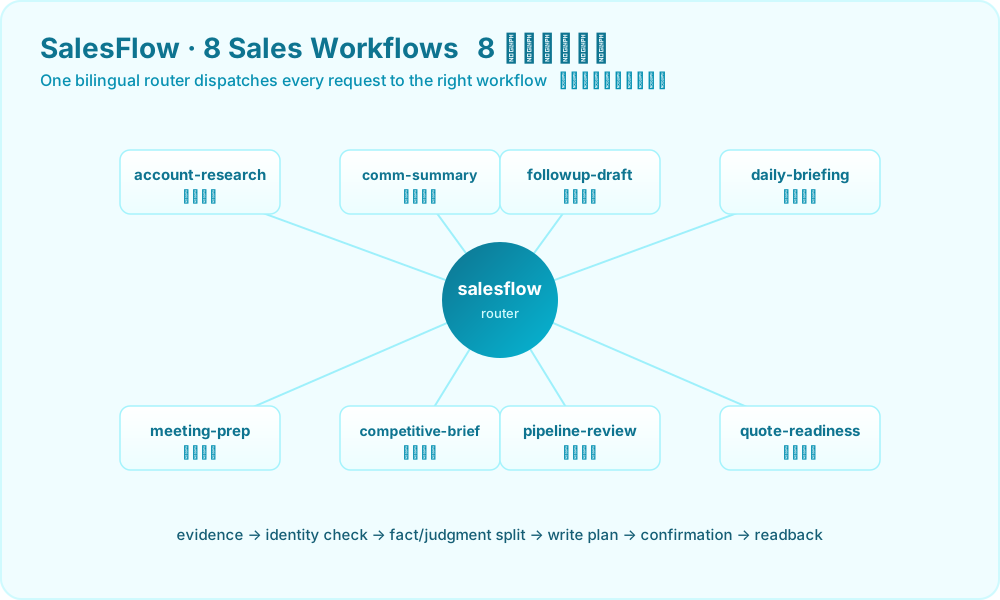
1. Account Research · account-research
Before: Last-minute Googling, email digging, and pinging colleagues before a meeting — half an hour to assemble a fuzzy impression, with key facts still missing.
After: Hand it your scattered materials, say "research Account A for me," and it produces a structured profile — company background, key contacts, interaction history, current stage, risk points.
Triggers: account research, company research, customer profile
2. Call Summary · communication-summary
Before: After a call or meeting, you write notes from memory and routinely turn a customer's "might consider it" into "already confirmed," blending fact and judgment.
After: Paste the conversation and it extracts hard facts (exact words, amounts, model, lead time) and action items, labeling judgment separately — "he'll probably order" gets explicitly tagged as a judgment, not written into the system as fact.
Triggers: call summary, meeting recap, extract sales notes
3. Follow-up Drafting · followup-draft
Before: Two fears haunt every follow-up email — it's either too dry and lifeless, or your hand slips and you promise a lead time or discount you can't honor.
After: It drafts the follow-up within the evidence boundary, based only on facts you've confirmed, inventing no promises. Which line is backed by evidence and which is suggested phrasing stays crystal clear.
Triggers: draft follow-up, draft outreach, follow-up email
4. Daily Briefing · daily-briefing
Before: You stare at a long account list each morning, decide by gut who to contact first, and important customers keep slipping through.
After: Just ask "who should I follow up today," and it ranks the accounts to touch, with a reason and a suggested action for each.
Triggers: daily briefing, today's follow-ups, sales briefing
5. Meeting Prep · meeting-prep
Before: A frantic scramble through documents before an important meeting — and you walk in still unsure what you want to achieve.
After: A one-page brief — customer background, agenda, potential risks, goals and fallbacks — that you can glance at two minutes before the meeting and feel ready.
Triggers: meeting prep, call prep, prepare for customer meeting
6. Competitive Battlecard · competitive-brief
Before: A customer says "Vendor X is half your price" and you freeze — then spend ages back at your desk digging through competitor material.
After: It produces a competitor comparison plus objection-response cards, breaking "why we're worth more" into a few angles you can say out loud immediately.
Triggers: competitive brief, battlecard, objection handling
7. Pipeline Review · pipeline-review
Before: You assemble the pipeline at the last minute before a weekly meeting, relying on whatever impression is in your head about what's stalled and what's next.
After: It walks the entire pipeline, flagging stalls, deals that have sat too long, and the next step for each — so your weekly review is grounded in evidence.
Triggers: pipeline review, account review, weekly sales review
8. Quote Readiness · quote-readiness
Before: A customer pushes for a quote, you rush one out, then realize the configuration wasn't confirmed, the lead time wasn't checked, a key spec is missing — and you're stuck reworking it.
After: A pre-quote self-check — is the information complete, can you even quote yet, what's still missing — closing the "should-have-asked" gaps before they bite.
Triggers: quote readiness, quote prep, quotation check
The Shared Discipline Behind All 8 Tasks
You may have noticed that every "after" isn't "the AI just does it all for you" — it's "the AI clarifies, drafts, and waits for your call." That's a deliberate discipline in SalesFlow:
evidence -> identity check -> fact/judgment split -> seller artifact -> write plan -> user confirmation -> readback
- Start from evidence, not memory or guesswork.
- Separate fact from judgment — the customer's words are not your inference.
- Confirm before persisting — the AI never edits your CRM on its own.
It's precisely this discipline that makes it safe to actually hand these tasks off — it's fast, but it doesn't go rogue.
Connect a Memory Layer to Double the Effect
SalesFlow itself is stateless: it can nail these 8 tasks from your current materials but won't remember for you. Connect KnowSales as the sales memory layer, and every review, follow-up, and battlecard can be confirmed and persisted — your team's experience grows thicker the more you use it. See our companion piece: Giving Your AI Sales Agent Persistent Memory with MCP.
If the next step is CRM or knowledge-base writeback, read: Before an AI Agent Writes to CRM, Require a Write Plan.
Summary
What sales truly lacks isn't enthusiasm — it's time. Hand these 8 high-frequency, repetitive, patterned tasks to an AI workflow plugin and reclaim the "prep" hours for actually closing deals:
| Task | Typical time (before) | SalesFlow (after) |
|---|---|---|
| Account research | Digging across sources | One sentence starts a structured flow |
| Call summary | Reconstructed from memory | Paste, then split facts from judgment |
| Follow-up drafting | 3 rewrites | Drafted within evidence |
| Daily briefing | By gut | Ranked by priority |
| Meeting prep | Last-minute scramble | One-page brief |
| Competitive battlecard | Frozen on the spot | Cards on standby |
| Pipeline review | From memory | Stalls all flagged |
| Quote readiness | Gaps found too late | Gaps closed before quoting |
👉 Install SalesFlow on GitHub — open source, bilingual, cross-platform. Hand off these 8 tasks today.